Honeywell T10+ Pro C7189R3002‑2 Manual | PDF User & Installation Guide
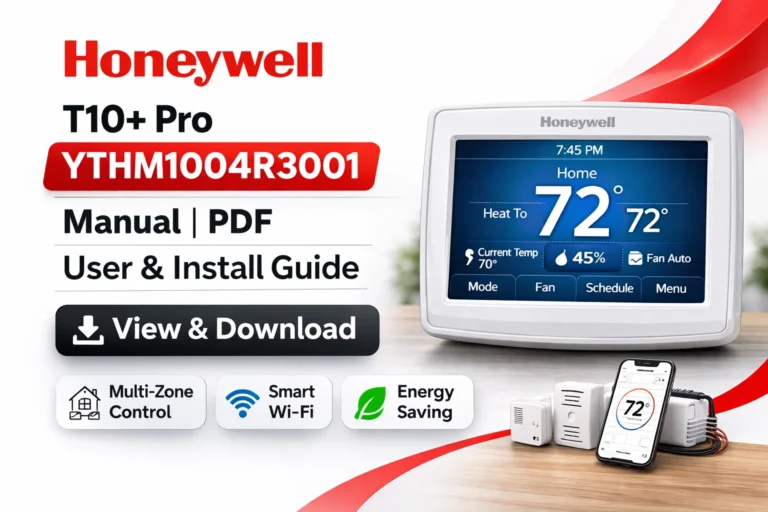
The Honeywell T10+ Pro C7189R3002‑2 is a state-of-the-art smart thermostat designed to provide precise temperature control, energy efficiency, and seamless integration with modern smart home systems. Whether you are a homeowner looking to upgrade your heating and cooling system or an HVAC professional responsible for installing complex multi-zone systems, this guide provides everything you need to understand, operate, and troubleshoot the T10+ Pro thermostat. On this page, you can view and download the user manual, professional installation guide, and product data sheet in PDF format for quick and convenient access.
What Comes in the Honeywell T10+ Pro C7189R3002‑2 Kit?
The Honeywell T10+ Pro C7189R3002‑2 comes as a complete kit that includes all components necessary for efficient multi-zone HVAC control:
- T10+ Pro Thermostat Unit: A sleek, touchscreen thermostat designed for intuitive use and easy control of multiple zones.
- Equipment Interface Module (EIM): Connects the thermostat to the HVAC system to enable multi-zone management.
- Integrated Air Sensor (IAS): Monitors temperature and humidity in real-time to maintain optimal comfort.
- Remote Air and Duct Sensors (RATS / DATS): Ensures accurate temperature readings in every zone of the home or office.
Together, these components allow precise and efficient control over every area of your property, enabling comfort and energy efficiency at the same time.
Key Features of the Honeywell T10+ Pro C7189R3002‑2
The T10+ Pro C7189R3002‑2 is packed with features that make it a standout thermostat for smart homes and professional HVAC setups:
Multi-Zone HVAC Control
With the EIM and remote sensors, this thermostat manages multiple zones independently. This ensures that each room or area maintains the perfect temperature based on occupancy, usage, or individual preferences.
Wi-Fi and Mobile Control
Connect the thermostat to your home Wi-Fi and manage your system remotely via the Honeywell Home App. Adjust temperature settings, schedules, and even monitor energy usage from anywhere in the world.
Smart Home Integration
Fully compatible with leading smart home ecosystems:
- Amazon Alexa – voice control your thermostat hands-free.
- Google Assistant – integrate with Google Home devices.
- Apple HomeKit – control via the Home app on iOS devices.
- Samsung SmartThings – automated routines and smart home triggers.
Adaptive Learning and Scheduling
The thermostat observes your routine and adjusts HVAC operations automatically. It optimizes start times and temperature setpoints for maximum energy savings while keeping your home comfortable.
Geofencing Automation
Automatically adjusts temperature settings based on your location. When you leave home, the system reduces energy usage; when you return, it restores comfort.
Advanced Sensors for Precision
The IAS and RATS/DATS sensors continuously monitor environmental conditions, allowing precise adjustments to maintain consistent comfort throughout all zones.
Download Honeywell T10+ Pro C7189R3002‑2 User Manual (PDF)
The user manual provides step-by-step guidance for:
- Thermostat installation and setup
- Connecting to Wi-Fi and mobile app
- Configuring multi-zone systems with EIM and sensors
- Integrating with smart home assistants
- Optimizing energy-saving features
- Troubleshooting common issues
Download Professional Installation Guide
The Professional Installation Guide is essential for HVAC technicians and advanced users. It contains:
- Detailed Wiring Diagrams: Ensure correct wiring for all system types.
- HVAC Compatibility Lists: Verify your system works seamlessly with the thermostat.
- Multi-Zone Setup Instructions: Learn how to integrate multiple RATS/DATS sensors efficiently.
- Mounting and Hardware Instructions: Proper placement of the thermostat for optimal performance.
- Sensor Pairing Steps: Ensure reliable and precise readings from all remote sensors.
Download Honeywell T10+ Pro C7189R3002‑2 Product Data Sheet
The Product Data Sheet contains all technical and performance specifications:
- Electrical ratings and power requirements
- Communication protocols for smart devices
- Environmental operating ranges for temperature and humidity
- Physical dimensions and mechanical specifications
- Multi-zone and sensor compatibility details
Step-By-Step Installation Overview
Installing the Honeywell T10+ Pro C7189R3002‑2 is straightforward with proper guidance:
- Turn off the HVAC system at the breaker panel to ensure safety.
- Remove the old thermostat, labeling all wires for easy reconnection.
- Mount the baseplate securely on the wall.
- Connect wires according to the detailed wiring diagrams provided in the professional guide.
- Attach the thermostat unit and restore power to the system.
- Complete the initial setup via the touchscreen interface.
- Pair the RATS/DATS sensors for accurate room and duct temperature monitoring.
Tips for Accurate Installation
- Ensure the C-wire is properly connected for full functionality.
- Place sensors away from drafts, direct sunlight, and heating/cooling vents.
- Mount the thermostat in a central location to ensure accurate temperature measurement.
Common Troubleshooting Solutions
- Thermostat not powering on: Verify the breaker and C-wire connection.
- Sensor connectivity issues: Re-pair sensors and check batteries if applicable.
- Wi-Fi connection problems: Ensure Wi-Fi is stable and within range; re-enter credentials.
- Temperature inaccuracies: Adjust sensor placement and calibrate if necessary.
Smart Home Integration
Connecting the thermostat to your smart home allows for seamless automation and convenience:
- Amazon Alexa: Voice control of temperature, schedules, and HVAC mode.
- Google Assistant: Smart home voice commands and routines.
- Apple HomeKit: Home app control for iPhone/iPad users.
- SmartThings: Integration with routines, triggers, and automated actions.
Maximizing Energy Efficiency
The T10+ Pro offers several features to reduce energy usage without sacrificing comfort:
- Adaptive Scheduling: Learn your daily habits and optimize heating/cooling cycles.
- Geofencing: Adjusts the system automatically when leaving or returning home.
- Zoning Control: Use RATS/DATS sensors to condition only the rooms in use.
- Eco Modes: Automatically balance comfort and energy consumption.
Comparing Honeywell T10+ Pro C7189R3002‑2 with Other Smart Thermostats
| Feature | Honeywell T10+ Pro | Ecobee Smart Thermostat Premium | Google Nest Learning | Emerson Sensi Touch Wi-Fi |
|---|---|---|---|---|
| Multi-Zone Support | Excellent (EIM + sensors) | Strong (SmartSensors) | Limited | No |
| Included Sensors | RATS/DATS | SmartSensors | Optional | None |
| Smart Home Integration | Alexa, Google, HomeKit, SmartThings | Alexa, Google, HomeKit, SmartThings | Alexa, Google | Alexa, Google |
| Adaptive Scheduling | Yes | Yes | Excellent | Basic |
| Geofencing | Yes | Yes | Yes | No |
| Professional Installation Recommended | Yes | Optional | Optional | Optional |
Summary:
For homeowners and professionals needing multi-zone control, precise temperature management, and robust smart home integration, the Honeywell T10+ Pro C7189R3002‑2 is an ideal choice. It provides comfort, efficiency, and intelligent automation across residential or commercial environments.
FAQs
What is the Honeywell T10+ Pro C7189R3002‑2?
A smart thermostat for advanced multi-zone HVAC control with Wi-Fi and smart home compatibility.
Can I install it myself?
Yes, but professional installation is recommended for multi-zone or multi-stage systems.
Does it integrate with smart home systems?
Yes, it works with Amazon Alexa, Google Assistant, Apple HomeKit, and SmartThings.
How can I save energy using this thermostat?
Use features like geofencing, adaptive scheduling, and zoning control to optimize energy use.
What sensors are included with this thermostat?
Integrated Air Sensor (IAS), Remote Room & Duct Sensors (RATS/DATS) for precise zone control.
Download More:
Conclusion
The Honeywell T10+ Pro C7189R3002‑2 is a premium thermostat designed for those seeking comfort, energy efficiency, and smart automation. Its multi-zone control, advanced sensor technology, and seamless smart home integration make it ideal for both residential and light commercial use. By following the manuals and guides provided, you can ensure a smooth installation, efficient operation, and maximum energy savings. Upgrade to the Honeywell T10+ Pro C7189R3002‑2 today for smarter, more reliable temperature control in every part of your home or office.